Monday, March 18, 2013

Google Penalized One Article On BBC’s Web Site


Google did end commenting on why the BBC received an unnatural link notification despite offering us a “no comment” on our story this past Friday.
Was the BBC penalized for unnatural links? Was it possible that the world’s largest news organization was not trusted by Google’s algorithms? The answer is, only one article was penalized.

Read More

Sunday, March 17, 2013

Google Search Engine Updates


Page Rank Has Changed, Google search engine update in full Effect. !!!

Feel like Chicken Little crying the sky is falling; one thing is for sure the sky is still up there, But is your posts still on page one of Google or on page ten. Is your post still number one on page one or number three four or five or at the bottom.
For some something wonderful has happened for other the Sky has just fallen. !!!
Really things are not where they were stuff that was on page one not there at all, thing that were on page 5 or 6 now on page 1 or 2.

This newest update on Google has really moved stuff around so much so, that everyone is going to notice that they are not where they use to be.
Now I just wonder how often stuffs going to move think this is a different Google Keeping it fresh and when someone comes along with new better information their going to step into that number one spot until better info is posted than they are out  too.
I find this very exciting seem like Google has leveled the playing field so to Speak.
More to come!

Author: 
Read More

Friday, March 8, 2013

Google Panda: 5 Tips You Should Know

Google Panda is a change to Google's search results ranking algorithm that was first released in February 2011. The change aimed to lower the rank of "low-quality sites" or "thin sites", and return higher-quality sites near the top of the search results. CNET reported a surge in the rankings of news websites and social networking sites, and a drop in rankings for sites containing large amounts of advertising. This change reportedly affected the rankings of almost 12 percent of all search results. Soon after the Panda rollout, many websites, including Google's webmaster forum, became filled with complaints of scrapers/copyright infringers getting better rankings than sites with original content. At one point, Google publicly asked for data points to help detect scrapers better. Google's Panda has received several updates since the original rollout in February 2011, and the effect went global in April 2011. To help affected publishers, Google published an advisory on its blog, thus giving some direction for self-evaluation of a website's quality. Google has provided a list of 23 bullet points on its blog answering the question of "What counts as a high-quality site?" that is supposed to help webmasters "step into Google's mindset". Read more....(wikepedia

It’s here. It’s inevitable. It’s called Google Panda, the latest Google’s search algorithm which aims to promote the high quality content site by dooming the rank of low quality content sites. Since its release and updates, many sites have been shown to be terribly affected by the algorithm, but the worst rumor here is, they can do almost nothing to recover the ranking and traffic.

(Image Source: famousbloggers.net)

Although the web haven’t sought out an absolute remedy to the Panda’s update, we all know that Panda is pretty much a content quality filter. We also know a proverb saying, “Prevention is better than cure”, so in this post we are going to provide 5 essential tips to help you to prevent the judgment by Google Panda. Full detail at the jump!

1. Separate Out Low Quality Content

The first and foremost thing you can probably do is to separate out all auto-generated content. Block the indexing and crawling of all low quality content to prevent it from lowering the ranking of your entire site. Low value content can cause the algorithm to slap down your entire site even if a great deal of your content is unique and valuable.

(Image Source: Fotolia)

To know whether your site content is low quality or not, here are some helpful questions asked by Google Webmaster Central Blog to aid you in determining the low quality content:
  • Does the site have duplicate, overlapping, or redundant articles on the same or similar topics with slightly different keyword variations?
  • Is the content mass-produced by or outsourced to a large number of creators, or spread across a large network of sites, so that individual pages or sites don’t get as much attention or care?
  • Are the articles short, unsubstantial, or otherwise lacking in helpful specifics?
  • Are the pages produced with great care and attention to detail vs. less attention to detail?
  • Does this article have spelling, stylistic, or factual errors?
Interestingly, identical low quality content is particularly endemic across e-commerce websites. For example, why should a pair of audio cables be described differently in each website and in each page on your website? Theoretically to meet the "unique" content guideline every product should be given an unique description and listing to avoid being marked as “low-quality” content by Panda.

2. Focus On Unique Content

As we know the Panda update is aimed to bring the judgment to the content farm and those sites which steal and duplicate, that means in order to prevent Panda from blacklisting you, you have to stop stealing other’s articles, and really focus on creating unique content.

(Image Source: Fotolia)

Try to look at your place in your industry and say to yourself:
  • “What is the topic that my readers will be interested about?”
  • “What do I offer to my readers that are unique? What about my content is just here and nowhere else?”
Don’t copy or retype out the article from other site, but craft your article out with your own topic and opinion. Details? Check out our post on how to run blogs that inspire.
That sounds pretty much like old school SEO practice, you might ask? The answer is yes, but now it’s the most important SEO practice!

3. Concentrate on Clout & Authority

In Richard Baxter’s article entitled High Quality Web Sites – The New Google Ranking Factor, elements like trust and authority matter in the new Panda update. It may extend to your links, your tweets and your resources related with the site.

(Image Source: SmartBloggerz)

According to the writer, trust could be measured by the links awarded to the article, and the more authoritative the link, the more trustworthy the article. If significant volumes of links aren’t enough just yet, possibly a shorter term solution could be to analyze the social buzz associated with the article, such as Twitter and Facebook.
We often talk about the links, but the site content itself is the critical factor which will attract the authoritative links and judged by Google Panda in the term of authority. On this part, Google Webmaster Central Blog has listed out some questions for you as a guideline to produce what they thought is the “authoritative content”:
  • Would you trust the information presented in this article?
  • Is this article written by expert/enthusiast who knows the topic well, or is it more shallow in nature?
  • Is the site a recognized authority on its topic?
  • Would you recognize this site as an authoritative source when mentioned by name?
  • Is this the sort of page you’d want to bookmark, share with a friend, or recommend?
So you know, these questions aren’t hard to answer, but challenging when it comes to implementation. Build your content with these questions in mind, and your site will be too good for both Google Panda and your fellow readers.

4. Keep Advertising Ratio Healthy

Sure we all like to be paid for ads, but apply ads with attitude. 3 sponsors at $10K are better than 20 ads at $500. Keeping your ads down to a healthy ratio is not only good with Panda but it also improves your reader’s user experience.

(Image Source: Fotolia)

So you know, ads is totally okay, but no advertisement scheme that will kill your reader’s user experience really fast, in term of visual experience and page loading speed. Healthy advertising ratio is even the reason that your readers will love and recommend your site than those sites with nastily cluttered ads, and by doing so will indirectly raise the trustworthiness and authority of your site.

5. Recognize & Track Panda Updates

Sites hit by Panda will show massive changes especially the page views. When using Google Analytics you will see an epic fall in traffic, that’s the possible sign of Panda. Limiting the search parameters in Google Analytics to the United States market will show the clear result of Panda attack. If you’re unfortunately the victim of the Panda, you can:
  1. Implement the changes suggested above.
  2. Ask Google to restore your rankings.
Don’t expect immediate improvement because Panda only updates periodically. If you still haven’t reached a Zen-like state of acceptance go and check out Barry Schwartz’s list and Panda archives at Seoroundtable.com or Mark Nunney’s Google Panda Survival Guide, or ultimately the Guidance of Building High Quality Sites by Google Webmaster Central Blog
And always remember that, all of these Panda updates are to remind you that, don’t be evil.

Source: hongkiat.com


Read More

Friday, March 1, 2013

Yahoo Clues, App Search & Other Products To Shut Down April 1


Since taking over as Yahoo’s CEO, she’s spoken repeatedly on the need to zero in on being part of its users’ “daily habits.”
Today, the company announced the shut down of seven products that don’t fit that “daily habit” mantra. Included in the group are a couple search-related products, including one under-the-radar keyword research tool that we (and others) have written about fondly in the past.
Yahoo Clues will be shut down on April 1st. It was poorly named and was primarily positioned as a search trends product, but for SEOs it was an interesting keyword research tool. Clues launched in late 2010 and was expanded about nine months later.
It provided a snapshot of keyword searches over time, plus great demographic information about keyword preferences between male and female, different age groups and by location.
yahoo-clues
I don’t know how widely used it was by search marketers, but in my experience, every time it was mentioned in conversation or blog posts, people had good things to say about Yahoo Clues.
Yahoo App Search is also shutting down on April 1st. This was a fairly standard search product with apps sorted by category and various filters available to searchers. Search results sent users to the appropriate app store if they wanted to buy/download something they found. Itlaunched in 2011.
yahoo-app-search
Also on Yahoo’s chopping block:
  • Yahoo app for Blackberry. This will no longer be available for download as of April 1st, but the existing will continue to work — unsupported — after that date.
  • Yahoo Avatars. This won’t be supported after April 1st.
  • Yahoo Sports IQ. This is shutting down on April 1st.
  • Yahoo Message Boards. Also shutting down on April 1st, but the message boards that within individual Yahoo sites (like Finance and Fantasy Sports) will remain active.
  • Yahoo Updates API. This won’t be supported after April 16th.
Read More

Thursday, February 28, 2013

How To Get Full Referral & Content URLs From Google Analytics


While cruising through the standard reports in Google Analytics (GA), you may have noticed that you can only get URIs (the part of the URL that follows the domain, AKA hostname). You can’t get the full URLs. That can be pretty unhelpful. So, I’m going to show you some tricks to pull full URLs into your GA reports in an export-friendly format.

Helpful Export Tip

Before you even get started creating these reports, you’ll need to know how to get all of the rows from your report into your export. The GA interface caps you out at 500 rows. However, to get more, just look at the bottom-right corner of your report to see how many rows you have.
row count in Google Analytics
Then, choose 25 from the “Show rows” drop-down. At the very end of the report URL, you’ll see this: table.rowCount%3D25. This tells GA that you want 25 rows. Change 25 to however many rows you need in your export — which would be 6001, in my case.

Get Full Referral URLs

This isn’t immediately apparent, but if you’re in the Referrals report (Traffic Sources > Sources > Referrals), the standard report is set up so that if you click on one of the referral sources, you’ll see the URI(s) visitors clicked through from.
referral drill-down in Google Analytics
Click for larger image
However, if you export the report (by clicking Export from the top navigation bar), you’re only going to get the URIs for the referral source you clicked on, not the sources and not the URIs for any of the other referral sources. Not very useful.
If you want the full URLs, you’ll need to create a custom report. If you’re not comfortable with creating a custom report in GA, I created a video walkthrough. You’ll never want to suffer the confines of standard reports again.
Here’s how I set up my custom report:
full referral custom report in Google Analytics
Click for larger image
Or, you can apply it to your own GA account by using this share link. Important: make sure you’re logged in to GA when you open the link — or copy it into a browser where you’re logged in. Otherwise, you’ll get a 404 error.
Pro Tip: If you want to create a pivot table with both the referral source and the full URL, use this custom report. This custom report will give you the ability to create a pivot table that lists the full referral URLs under the source to easily group multiple links from the same site. Your pivot table would look something like this:
source + referrals in Google Analytics custom reports


Read More

Wednesday, February 27, 2013

Google Panda Two Years Later: Losers Still Losing & One Real Recovery


Two years ago today, Google sent shockwaves through not only the SEO industry, but also through online publishing in general when it launched the Panda algorithm update.
It was originally called the “farmer” update because Google’s prime target was “content farms,” a name used to describe sites that created high-quantities of low-quality content that sometimes ranked highly in Google’s search results. Although Google didn’t specifically say it was targeting content farms when Panda launched, Matt Cutts, head of Google’s webspam team, told us at the time: “I think people will get the idea of the types of sites we’re talking about.”
People did.
And Google’s targets became more obvious in the days after Panda launched when several search and software companies began issuing lists of winners and losers — websites that had been hurt or helped by Google’s algorithm change.
Of course, for every loser that lost search visibility, there’s also a winner that gained search visibility. But few of those winners have spoken out in the two years since Panda.
As you’ll see below, on a list of nearly two dozen of Panda’s original losers, only two websites have returned to the SEO visibility that they had about three weeks post-Panda. The others have all continued to lose search visibility.
Some other Panda-hit websites have recovered, though not all of those recoveries have been permanent. We’ll look at all that later in this article. First, some background.

Background: Panda’s Original Winners & Losers

It only took two days for the first look at Panda’s winners and losers to come in. Companies like SearchmetricsSistrix and others used their own tools and data to tell which websites lost or gained visibility in Google’s search results. Though these reports are far from official, many of the sites impacted eventually stepped forward to confirm that they were hit.
Panda’s early winners included several major content destinations like YouTube and Wikipedia, plus large brands like eBay and Amazon. Hundreds of other sites, big and small, no doubt saw their visibility go up as others were hurt. As I said above, for every loser that drops out of Google’s search results, there has to be a winner replacing it.
Our reports on Panda’s early losers listed hundreds of sites; here are some that were commonly included:
  • EzineArticles.com
  • HubPages.com
  • AssociatedContent.com
  • Mahalo.com
  • Examiner.com
  • Suite101.com
  • Buzzle.com
  • Squidoo.com
  • Buzzillions.com
You might’ve expected to see some of Demand Media’s sites on that list, but they were largely left off the first lists of Panda losers. More on that in a moment.

How Are The Panda Losers Now?

In a nutshell: Still losing.
In fact, some of Panda’s losers no longer exist and others have completely changed their name and/or business model. That’s the topic of tomorrow’s article.
We recently asked Searchmetrics to go back to one of its original lists of Panda losers from two years ago, and run its same “SEO Visibility” report on some of them. The company did that last week, and provided loads of information. (Note: We also contacted Sistrix with a similar request, but didn’t receive a reply in time for inclusion in this article.)
Searchmetrics looked at 22 Panda losers and compared their visibility in Google’s search results at three points:
  1. Before Panda (February 20, 2011)
  2. After Panda (March 13, 2011)
  3. Now (February 17, 2013)
The results? None of the 22 sites has returned to its pre-Panda visibility, and only two sites have improved their visibility today compared to their post-Panda visibility.
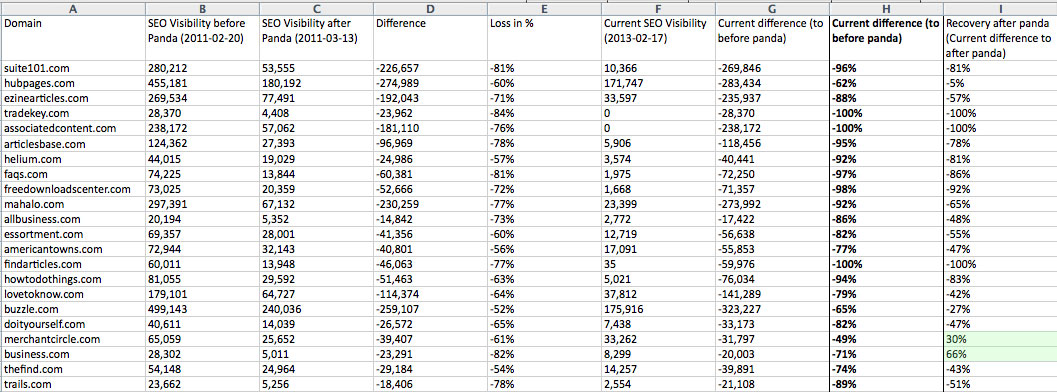
Here’s a spreadsheet that Searchmetrics shared with us (you can click to see a larger version):
panda-sheet-1
(Note: The numbers reflect Searchmetrics’ “SEO Visibility” score, which doesn’t reflect estimated traffic losses, but instead reflects how visible a domain is in Google’s search results across millions of keywords that the company tracks.)
In the image above, the key columns are to the far right: H and I. The way to read it is this: Suite101.com has seen its SEO visibility drop 96 percent since before Panda and has dropped 81 percent from its post-Panda visibility.
If you browse down column I, you’ll only see two sites with a positive number: Both MerchantCircle.com and Business.com have rebounded enough to have their current SEO visibility score be better than it was after Panda launched. But, as column H shows, both are both still far less visible than they were before Panda came along — as are all of the other 20 sites in this Searchmetrics list.
The SEO visibility chart for Business.com, shown below, is an eye-opener.
businesscom
Panda’s impact is obvious in February 2011, and the site’s visibility looks like a seesaw after that. It appears to have won back visibility in late 2011 or early 2012, around the time of Panda 9or 10. It’s bounced a few times since then and today is doing a little better than it was right after Panda, but nowhere near pre-Panda visibility.

What About Demand Media Sites?

They’re not included above because, for the most part, they weren’t originally among the big Panda losers.
The company’s flagship site, eHow.com — a site that many associated with the term “content farm” — was actually reported to have gained visibility when Panda launched. That didn’t last long, though; eHow was hit a couple months later when Google rolled out Panda 2.0. Searchmetrics’ chart shows eHow gaining visibility in February 2011 when Panda launched, but losing it in April 2011.
panda-ehowcom-with-date
Although the site’s visibility appears to have gained a bit since September 2012, it’s still down 63 percent in Searchmetrics’ SEO visibility score compared to pre-Panda levels.
Another Demand Media site, Livestrong.com, spent much of 2012 on the rebound from Panda.
Searchmetrics says its SEO visibility dropped 35 percent in the first few weeks post-Panda — far less than some of the others mentioned above. But, as the chart below shows, it not only rebounded in 2012, but also far exceeded its SEO visibility … at least until the latter portion of the year.
panda-livestrong-with-date
After regaining visibility all year long, it appears that Livestrong was hit hard by Panda Update 22in late November. It’s been dropping ever since. Today, Livestrong.com is about 13 percent below its pre-Panda visibility.
Panda hurt Demand Media: A year ago, the Los Angeles Times reported that Panda was to blame for Demand suffering a $6.4 million loss in Q4 of 2011.
But just last week, in its latest earnings report, Demand Media said that page views were up 24 percent in 2012 (compared to 2011) on its owned and operated websites, “driven primarily by strong traffic growth on eHow.com and Livestrong.com.” In the statement, CEO Richard Rosenblatt said the company “improved content quality” in 2012 and is “now prepared to significantly increase our content investments in 2013.”
Despite that optimism, Demand Media’s sites appear to be a mixed bag at this point in terms of post-Panda recovery.
At least one other site, however, has done better.

MotorTrend.com: A True Panda Recovery

Motor Trend is a long-running magazine with a presumably trusted website, and its annual “Car of the Year” award is about as prestigious as it gets in the auto industry. I’m not a Motor Trend reader, nor have I ever spent quality time on the MotorTrend.com website. So, I can’t speak to whether it deserved to get hit by Panda. But it certainly did, as this Searchmetrics chart shows:
panda-motortrend
MotorTrend.com was obviously hit in the initial Panda update, then recovered in July 2011 around the time of Panda 5. It dropped again with Panda 7 — and we mentioned it in our coverage — then quickly recovered again a couple weeks later with Panda 8.

Read More

Slides

Powered by Blogger.

Blog Archive

© 2011 IM (Internet Marketing) Optimizer| Search Engines Marketer India, AllRightsReserved.

Designed by ScreenWritersArena